
12.5%
12.5%
Websites used ubuntu server.
Websites used ubuntu server.
&
&
2758
2758
Companies used VirtualBox.
Companies used VirtualBox.
HOW ABOUT VIRTUALBOX?
VirtualBox is a virtualization software that allows users to run multiple operating systems on one physical machine.
HOW ABOUT VIRTUALBOX?
VirtualBox is a virtualization software that allows users to run multiple operating systems on one physical machine.
WHAT IS UBUNTU SERVER?
WHAT IS UBUNTU SERVER?
Ubuntu Server is a popular, open-source operating system designed for use as a server.
Ubuntu Server is a popular, open-source operating system designed for use as a server.
DOWNLOADS.
Go to the links below for the downloads.
DOWNLOADS.
Go to the links below for the downloads.
INSTALL.
Just install the VirtualBox. We deal with Ubuntu Server ISO file later.
On Virtual Box installer, follow the instruction until FINISH. Straightforward. Super easy.
INSTALL.
Just install the VirtualBox. We deal with Ubuntu Server ISO file later.
On Virtual Box installer, follow the instruction until FINISH. Straightforward. Super easy.


STEP
01
STEP
02
NEW.
(ctrl+n)
Open the Virtual Box and create new machine.
Open the Virtual Box and create new machine.


GUEST.
Configure your guest OS install. Modify the username, password, and hostname.
Configure your guest OS install. Modify the username, password, and hostname.

LOCATE.
Name your new machine and locate the Ubuntu Server ISO local file.
Name your new machine and locate the Ubuntu Server ISO local file.

HARDWARE.
Adjust the machine’s hardware as necessary.
Adjust the machine’s hardware as necessary.

REVIEW.
Review the summarized configuration for the new machine. If okay, FINISH.
Review the summarized configuration for the new machine. If okay, FINISH.

Congratulations. You just create the virtual machine. Cheers!
Congratulations. You just create the virtual machine. Cheers!

STEP
03
START.
Start the machine, install the Ubuntu Server on your demand.
No sweat. Here are some documentation that may helps.
START.
Start the machine, install the Ubuntu Server on your demand.
No sweat. Here are some documentation that may helps.


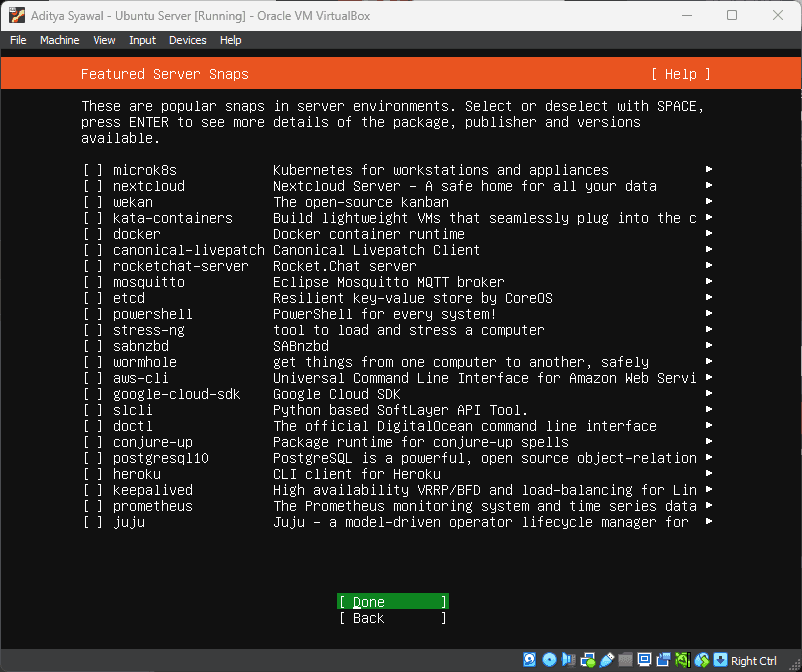


UBUNTU SERVER INSTALLED.
UBUNTU SERVER INSTALLED.
UBUNTU SERVER INSTALLED.